Export Power BI Tables to Excel, CSV, JSON, PDF — BI Table Exporter
Professional Data Export Tool for Power BI
Export Power BI tables to Excel, CSV, JSON, PDF in one click. No 30K row limits. Works with embedded reports & iframes. 500 rows free. 100% local — your data never leaves your browser.
Interface Preview
Explore the extension's user interface and features
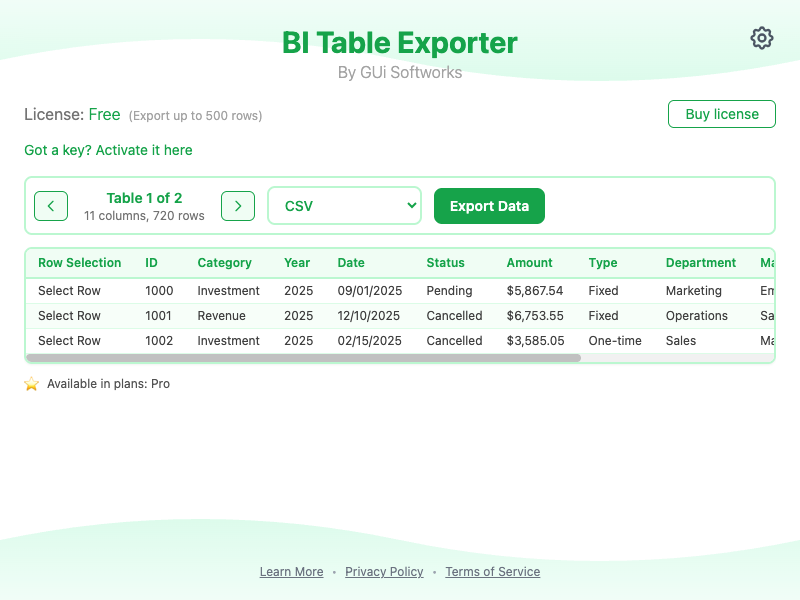
✨ Key Features:
Transform your Power BI reports into actionable data with our powerful export extension.
Export to Excel, CSV, JSON, HTML, and PDF formats
Smart table detection — automatically finds Power BI tables and matrices
Works with embedded Power BI reports in iframes and cross-domain embeds
Free version: Export up to 500 rows
Paid plans: Unlimited exports with all formats
No data collection — all processing is local
Privacy-focused approach — your data never leaves your browser
Why Power BI Users Choose BI Table Exporter
Power BI's native export limits you to 30,000 rows for CSV and 150,000 rows for Excel. For analysts working with large datasets or embedded reports, these limits are a daily frustration. BI Table Exporter removes these barriers entirely.
BI Table Exporter detects Power BI tables automatically — including tables inside iframes, embedded dashboards, and cross-domain reports — and exports them to Excel, CSV, JSON, HTML, or PDF in one click. No manual copy-pasting. No formatting loss.
Unlike cloud-based tools, all processing happens locally in your browser. Your data never leaves your device. Export 500 rows for free, or upgrade to Pro for unlimited exports. Perfect for analysts, BI professionals, and anyone who needs their Power BI data in standard formats.
📊 Export Formats:
Export your data in multiple professional formats
Excel (XLSX) — For advanced analysis and reporting
CSV — For spreadsheet applications and data pipelines
JSON — For API integrations and data processing
HTML — For web viewing and sharing
PDF — For professional reports and presentations
💡 How to Use
Get started in 4 simple steps
Navigate
to any Power BI report or embedded dashboard
Click
the extension icon in your browser toolbar
Select
your desired export format (Excel, CSV, JSON, PDF, HTML)
Download
your data instantly — no row limits with Pro
🎯 Perfect For:
Built for professionals who work with data
Data Analysts exporting Power BI to Excel
Business Intelligence Professionals
Report Creators working with embedded dashboards
Data Scientists handling large datasets
Anyone who needs Power BI data in standard formats
📋 Plan Comparison
Choose the plan that fits your needs
🆓 Free Plan
Perfect to get started
- ✓Export up to 500 rows per table
- ✓CSV and JSON formats only
- ✓Basic table detection
- ✓No registration required
- ✓100% local processing
⭐ Paid Plans
For professionals
- ★Unlimited row exports — no 30K or 150K limits
- ★All formats: Excel, CSV, JSON, HTML, PDF
- ★Advanced table and matrix detection
- ★Priority support
- ★License management dashboard
Frequently Asked Questions
How do I export a Power BI table to Excel?+
What is the row limit for Power BI export?+
Can I export from embedded Power BI reports?+
Is my data safe when using BI Table Exporter?+
Does BI Table Exporter work with Power BI matrices?+
🔒 Privacy & Security:
Your data security is our top priority
No personal data collection
All processing happens locally on your device
Works only on Power BI pages
Secure license validation
100% local — data never sent to external servers